Awwwards Breakdown: Wild Week - Athens
June 16, 2026
Hover over the statue!
As a creative developer, I love looking at Awwwards winning sites and I have a goal of one day achieving Site of the Day honors. I'll occassionally find sites so inspiring that I try to reverse engineer features. In this article, I break down my approach to reverse engineering the hover effect on the April 26, 2026 Site of the Day, Wild Week - Athens.
Overview
The Wild Week - Athens site features artwork that takes on an embossed paper appearance. The background color of the site offers the illusion that the featured statues and patterns are simply raised elements of the background itself. However, when hovered these elements reveal a silver, metallic appearance. As your cursor moves away, this silver color fades and the parchment appearance returns.
Wild wrote a wonderful piece offering insight into their development process and I used that as a starting point to determine my high level approach to recreating the effect. To break down my process into parts, I started with the 3D modeling, I developed the intuition for my desired shader modifications, and then I wired up the hidden canvas element tracking mouse/pointer movement.
Everything's a Plane
On first glance I assumed I'd be positioning 3D models of statues and manipulating material properties within Three.js. To my surprise, Wild's article explains that the relevant elements were created using 2D planes, normal maps, and alpha maps. Normal maps and alpha maps are 2D images used exclusively for the RGB values they store for each pixel, where the former manipulates bumpiness of an object and the latter manipulates the object's transparency. With both maps and some clever camera placement, you can make a 2D plane look like a 3D shape (think of a sheet being wrapped around the statue with the excess fabric cut away).
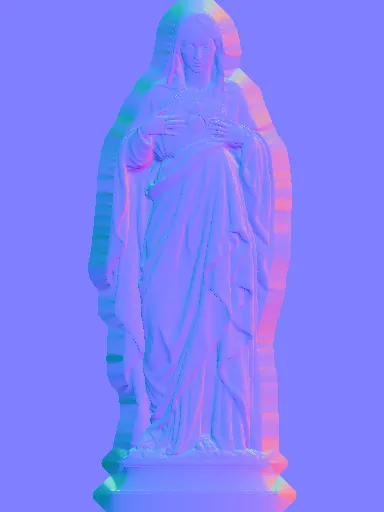
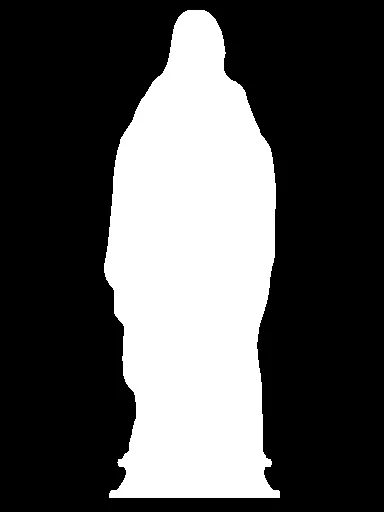
Pixels from the normal map contain red, green, and blue channel values that determine how the 2D plane interacts with light to simulate elevation. Similarly, pixels from the alpha map contain RGB values that determine which parts of the plane are visible.
Wild used AI to help generate these image maps but I used Blender. I took a plane and a free 3D statue model that I found online to bake out the normal map and alpha map, and I gave both of those images to my Three.js plane's material.
For the desired alpha map effect I needed an image with only black and white pixels, so I took a picture of my statue in Blender with a transparent background and then used imagemagick to map the transparent pixels to black and the opaque pixels to white. When passed along to my Three.js material, this cut the statue shape out of my plane.
GLSL Injection
I didn't want to get too fancy with the default statue appearance and I ended up liking the way that the MeshStandardMaterial looked when I provided a color, the normal map, and the alpha map. The problem was that I definitely needed custom shader behavior to transition between the default green and metallic pink. I was happy with the MeshStandardMaterial shader, but I wanted to add a little more. Thankfully Three.js materials have a method for doing exactly this: onBeforeCompile! As the name suggests, it runs a callback function before the material's shader is compiled, meaning that it's a great last minute opportunity to throw in some extra GLSL!
The snippet above represents the last thing that happens in our shader. The brightness factor gives the metallic pink its reflective quality and the final color (gl_FragColor) is a mix between the unchanged version of itself (the default green) and the metallic pink, based on this mysterious trail value. If trail is zero then the shader outputs green, if trail is one then the shader outputs pink, and every trail value in between results in some in between color. So trail is actually doing a lot of the heavy lifting here, but in order for me to show you what trail is I have to reveal the hidden intermediary step.
The Secret Canvas!
Your pointer position isn't being sent to the shader, it's being sent to an invisible canvas element. This preprocessing step is important because shaders aren't great at remembering what they've done after they've done it. The shader can assign pink but it can't easily tell you what the decreased pink value should be as that pink fades away. The Canvas API, however, is great for drawing shapes and fading them away!
Hover over the canvas!
In the same way that we used images as data for the normal map and alpha map, we also extract and use data from each frame of this canvas. The intensity of each pixel's white color (measured as the red channel's value between 0 and 255) is actually what we use as the trail factor mentioned earlier. A white pixel in the canvas is represented by pink on the statue, and a black pixel is represented by green on the statue.
You may notice that the canvas fade effect doesn't return white pixels to true black. To account for this we set the trail factor to 0 when the pixel's red channel is at 10% strength or below. If we didn't account for this then hovering over the statue would always leave behind a pink tint.
Finishing Touches
It's not exactly what Wild Week - Athens has but it's close. The Canvas API was used to handle the small details like the wobbly blob border of the shape underneath your pointer and the blob's growth/decay based on the speed at which your pointer is moving, and Perlin noise was used to adjust the speed of each pixel's fade.
There's also room for the approach described here to be improved! The compilation of relatively simple tools to create this beautiful, complex effect has performance drawbacks that might be revealed on larger scales. The computations required for each pixel in the invisible canvas are handled entirely by the CPU, whereas a more rigorous shader approach could take advantage of the raw throughput capabilities of a GPU. That being said, as a starting point, the invisible canvas approach earns its place: it's fast, flexible, and it gets you really close to something you'd find on an Awwwards Site of the Day.